微信小程序在电脑上打不开怎么办?只需打开兼容模式就好啦~

微信小程序在电脑上打不开怎么办?| The Solution of WeChat Mini Apps Can Not Opened On PC

微信小程序在电脑上打不开?只需打开兼容模式就好啦!

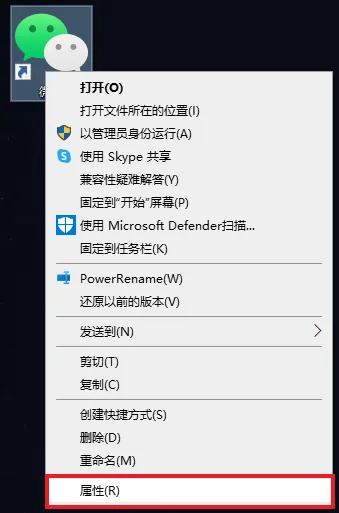
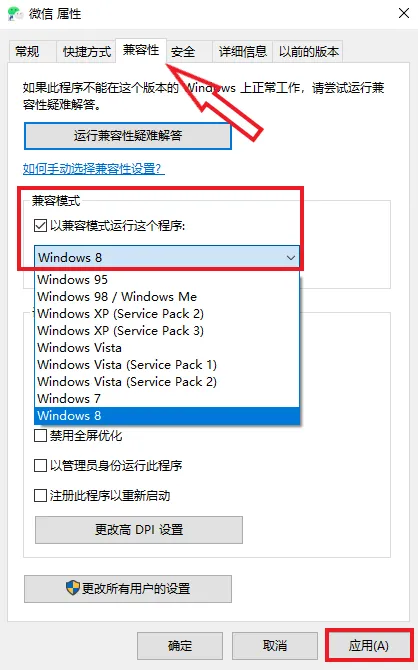
当您的微信小程序(WeChat Mini App)在电脑端无法打开时,大家可以直接右键桌面微信的快捷方式,点击“属性”,找到“兼容性”,然后勾选“以兼容模式运行这个程序”,并选择“Windows 8”系统,最后点击应用,就可以正常在电脑端打开小程序了。

解决电脑端微信小程序无法打开的操作步骤

1、右键桌面的微信快捷方式,点击最下方【属性】。

2、上方找到【兼容性】,勾选【以兼容模式运行这个程序】,下方选择【Windows 8】。

What We Provide

Managed IT Service

Network Optimize

How can we help you?

Call Us, Write Us, Or Knock On Our Door. We are here to help. Thanks for contacting us!


Recent Posts

Network Troubleshooting Steps and How to Change the DNS Address

解决电脑浏览器打不开网页的问题

Woman at small business entrance

Make Guest Users show up in the Address Book (GAL)

发表评论

您的电子邮箱地址不会被公开。 必填项已用*标注

CN